The best law firm website design gets a qualified prospective client to call or send a case review from a phone, in the language they speak, without breaking California's attorney advertising rules. We checked six real California firm homepages on November 2, 2026 for exactly that: tap-to-call links, intake fields, Spanish access and structured data.
By ByteZero Editorial Team · Updated November 2, 2026
General marketing information, not legal advice. Confirm advertising and accessibility questions with your own counsel.
Key takeaways
- Look at the intake form first. The design choices that stood out were intake fields: a required conflict-check question in San Diego, and a charge picker and court-date field on our client's Los Angeles site.
- Spanish access is a design decision with a rule attached. 44.4% of Californians aged five and up speak a language other than English at home, and Rule 7.1 comment [5] limits how a site may claim another language.
- Three of six homepages showed Spanish access in their code. One, a large litigation firm, showed no phone link and no intake form at all.
- A firm website is a communication under Rule 7.1. Where it advertises services, Rule 7.2(c) requires the name and address of at least one responsible lawyer or firm.
- Speed has a public target. Google's Core Web Vitals call for Largest Contentful Paint within 2.5 seconds at the 75th percentile of page loads.
One of the sharpest fields on any California law firm homepage we opened this week asks about someone who is not the client. Wilkinson & Finkbeiner, a San Diego family law firm, makes "Name of Opposing Party" a required field in its contact form. The placeholder text tells the visitor it is for internal use as a conflict check and that the other side will not be contacted.
That is a design decision. It sits on the page next to the phone number, and it decides how much the firm knows before anyone picks up the phone to call back.
When we checked this search from California on October 27, 2026, page one held design galleries, template shops and agency roundups: Dribbble, 99designs and Canva templates among them. Those pages show what a law firm site can look like. They do not show whether a stranger, on a phone, in the worst week of their year, can reach the firm. So we opened the code instead.
What makes the best law firm website design?
The best law firm website design is the one that turns a qualified visitor into a call or a completed intake form, on a phone, while staying inside Rules 7.1 and 7.2 of the California Rules of Professional Conduct.
Looks matter, but only after five plain tests:
- One tap to a human. A
tel:link the visitor can press, placed where a thumb finds it. - An intake form that asks what the firm needs and nothing else. Every field should earn its place: a conflict check, a charge type, a court date.
- Honest language access. If the site says or implies Spanish service, someone at the firm has to deliver it.
- Machine-readable. Structured data that labels the firm as a
LegalServiceorAttorneyin the page code, so software reading the page can tell what kind of entity it is. - Fast enough on a phone. Google publishes the thresholds, covered below.
We scored all six sites on those five points. Color, typography and photography are left out because taste cannot be checked in the code.
Top law firm website design examples in California
These are six public California firm websites across five practice areas. We fetched each homepage on November 2, 2026 with a phone browser's user agent and recorded only what is in the page code: phone links, form fields, language links, chat scripts and schema types. We have no relationship with five of the six. The sixth is a client of ByteZero, our parent agency, and is labeled as such.
Wilkinson & Finkbeiner (San Diego, family law)
The contact form has seven visible fields. Two of them stand out: the required "Name of Opposing Party" field, and a required checkbox confirming the visitor has read the form disclaimer. The firm's own placeholder text explains the first one: the name is for a conflict check, and the other side will not be contacted. So the form collects the one name the firm has to clear before the conversation starts.
The homepage carries three phone numbers, one each in the 310, 619 and 949 area codes, with six tap-to-call links in total. The homepage schema includes a LegalService type.
What to copy: put your conflict check in the form, and tell the visitor in plain words why you are asking. For how that first contact connects to California's prospective-client duties, see our legal intake guide.

Walkup, Melodia, Kelly & Schoenberger (San Francisco, personal injury)
The header has a link labeled "En Español" that points to a /es/ section of the site. The homepage loads a live-chat script (nGage), and the form has six visible fields, one of which is "How did you hear about us?"
That last question is unglamorous and useful. It is attribution at almost no cost: the client tells you which channel worked, in their own words, on day one.
The homepage carries one tap-to-call link and an Attorney schema type.
Wilshire Law Firm (Los Angeles, personal injury and employment)
Wilshire's homepage says "Hablamos Español" and states that its intake team is available 24/7, in English or Spanish. That is the honest version of a Spanish toggle: it says who answers, not just which flag to click.
It also has a block worth a close look. Under the heading "Research with AI," it offers prefilled links that open a question about the firm in ChatGPT or Google AI, and invites the visitor to compare what they find. For a firm that expects prospects to ask an assistant anyway, it is a confident move.
The trade-off is weight. Wilshire's homepage HTML came to 648 KB on our fetch, the heaviest of the six, with 22 tap-to-call links in the markup.
Panish | Shea | Ravipudi (Los Angeles, personal injury)
This homepage carries the most schema types of the six. The JSON-LD includes LegalService, Organization, Person, FAQPage, Review and ScheduleAction types, among others.
It is also the only one of the six with more than one non-English path in the header: links labeled "Es," "Cn" and "Kr" point to Spanish, Chinese and Korean pages. Three short links, sitting next to the phone number, cost almost nothing in design space.
The form asks for name, phone, email, how the visitor heard about the firm and a case description, and then a required yes-or-no question: whether the visitor consents to the firm sharing their information with another law firm, as described on the form. A referral relationship disclosed at the point of capture, with an explicit choice, is a design pattern other firms that refer out could study with their ethics counsel.
Munger, Tolles & Olson (Los Angeles, litigation)
Munger's homepage has no tap-to-call link and no intake form. The only form in the page code is a site search. The page code also carries a notice that the firm cannot treat unsolicited information as confidential, and it asks visitors not to send anything confidential until they receive an engagement letter. Same conflict-check logic as the San Diego form, pointed the other way: one firm collects the opposing party's name up front, the other asks you to send nothing yet.
By the five tests above, it scores low. That is the point of including it. The same notice says the firm cannot take on a representation until it has cleared conflicts, and the homepage does not invite a stranger to type out their story at 11 p.m. So "best" depends on who is buying. If your clients find you in a crisis, do not copy this one. If they reach you through a referral, study how little it asks.
Law Office of Aaron P. McAllister (Los Angeles, criminal defense) · our client
Disclosure first: ByteZero rebuilt this site in 2026, and it is one of our published case studies. The form opens with "What are you facing?" and a one-tap charge picker: DUI, Domestic violence, Felony, Drug offense, Theft / fraud, Not sure yet. After name, phone and email comes an optional "Next court date" field, then a message box whose placeholder reads "Facts only." A line under the button says submitting the form does not create an attorney-client relationship.
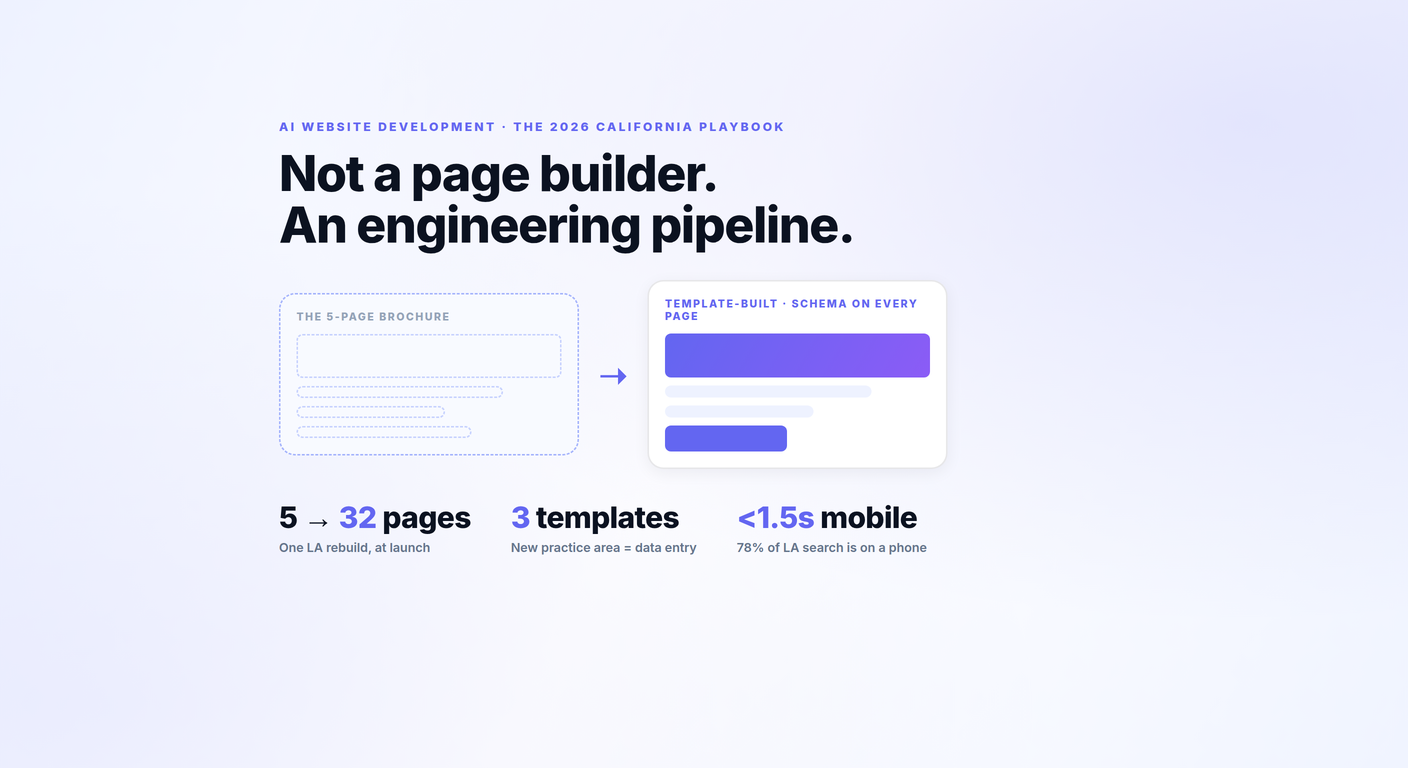
The court date tells the lawyer, before the first call, how much time there is until the client's next appearance. The McAllister case study covers the rebuild itself: five pages to 32, three reusable templates, and schema on every page. It also says plainly that the site launched in August 2026 and no traffic or lead figures are reported yet, so none appear here.
How the six websites compare
Each row is what we found in the homepage code on November 2, 2026, fetched with an iPhone user agent. A "no" means we did not find it in the homepage HTML. Some sites load chat or language tools later through a tag manager, so treat a "no" as "not on first load," not as "the firm does not offer it."
| Firm | City, practice | Tap-to-call links (count) | Visible intake fields (count) | Spanish access on homepage | Chat script in HTML | Legal entity schema | Homepage HTML (KB) |
|---|---|---|---|---|---|---|---|
| Wilkinson & Finkbeiner | San Diego, family law | 6 | 7 | No | No | LegalService | 111 |
| Walkup, Melodia, Kelly & Schoenberger | San Francisco, personal injury | 1 | 6 | Yes, "En Español" link | Yes | Attorney | 178 |
| Wilshire Law Firm | Los Angeles, PI and employment | 22 | 5, plus a one-box starter | Yes, "Hablamos Español" | No | LegalService | 648 |
| Panish Shea Ravipudi | Los Angeles, personal injury | 11 | 7 | Yes, "Es" link (plus Chinese, Korean) | No | LegalService | 365 |
| Munger, Tolles & Olson | Los Angeles, litigation | 0 | 0 (search only) | No | No | Organization only | 148 |
| Aaron P. McAllister (our client) | Los Angeles, criminal defense | 4 | 5, plus a charge picker | No | No | LegalService | 113 |
Source: homepage HTML of each site, fetched November 2, 2026. Field counts exclude hidden spam-trap fields. HTML size is the document alone, not images or scripts, and is not a load-time measurement.
Field count alone tells you little: the forms worth copying ask for something the lawyer needs on the first call, like an opposing party or a court date. And language access shows up in two different forms: a separate language section (Walkup, Panish) or a plain statement of who answers in Spanish (Wilshire).
What California rules shape law firm website design?
Rule 7.1 of the California Rules of Professional Conduct governs every communication about a lawyer's services, and its comment [1] says that covers communications "of any type whatsoever," so the website is in scope.
The State Bar's Chapter 7 rules translate into five design checks. Start with the hero copy, because comment [2] treats an express guarantee or warranty of a result as false or misleading. Then the results block: comment [4] says truthful results or testimonials can still mislead if they create an unjustified expectation, and notes a disclaimer often avoids that. Put the disclaimer next to the results, not in a footer.
Fee banners are next. Comment [3] says any communication that states or implies "no fee without recovery" is misleading unless it also discloses whether the client will be liable for costs, so "no fee unless we win" needs a costs line in the same place.
Language links come fourth. Comment [5] bars stating or implying service in a language other than English unless the lawyer can actually provide it, or the communication also states, in the language of the communication, the employment title of the person who speaks it. Last, the footer or contact block: Rule 7.2(c) requires the name and address of at least one responsible lawyer or firm.
"Any communication made pursuant to this rule shall include the name and address of at least one lawyer or law firm responsible for its content."
California Rules of Professional Conduct, Rule 7.2(c)
The language point carries weight in this state. The U.S. Census Bureau's QuickFacts for California puts the share of residents aged five and older who speak a language other than English at home at 44.4% (American Community Survey, 2020-2024). A Spanish toggle that routes to an English-only phone line is a design flaw and, under comment [5], a compliance question. Our SB 37 guide covers how California's advertising statute treats firm websites.
Accessibility belongs on the same checklist. In Martinez v. San Diego County Credit Union (2020), a blind plaintiff sued under the Unruh Civil Rights Act over a website he said blocked his screen reader, alleging missing alternative text, empty links, redundant links and missing form labels. He sought $4,000 per violation, the minimum Civil Code section 52 sets for each offense. The Court of Appeal reversed the trial court's dismissal, holding he had alleged enough of a connection between the website and the credit union's physical locations to state an ADA claim. Whether a given firm's site is covered is a question for counsel. Labeled form fields and real alt text are a design question, and they are cheap.
How fast should a law firm website load?
Google's Web Vitals guidance sets the targets: Largest Contentful Paint within 2.5 seconds, Interaction to Next Paint of 200 milliseconds or less, and Cumulative Layout Shift of 0.1 or less, measured at the 75th percentile of page loads.
The 75th-percentile part matters. A site that loads fast on the managing partner's office Wi-Fi can still miss the target for the visitor on a weak signal outside a courthouse. Measure on mobile, in the field data, not only in a lab test on a desktop.
Our HTML-size column is a rough tell, not a score. A 648 KB document is not automatically slow, and a 111 KB one is not automatically fast, but heavy markup is one more thing a phone downloads before the page is complete. Our earlier piece on law firm website speed and conversions walks through measuring and fixing each metric.
What do the best law firm website design companies do differently?
The best law firm website design companies can show you the intake form, the schema and the compliance review on a real build, not only a portfolio of homepages.
When you interview a designer, ask them to open a site they built on their phone, in front of you, and walk through five things:
| Question to ask | What a good answer shows you | Why it matters |
|---|---|---|
| "Show me the intake form on mobile." | Fields chosen for the practice area | Conflict check, charge type or court date beat a generic "message" box |
| "Who reviews the copy against Rules 7.1 and 7.2?" | A named step before launch | Guarantees, results and language claims live in design copy |
| "What schema type names the firm?" | LegalService or Attorney in the code | Structured data labels the firm as a legal entity for software reading the page |
| "What are the mobile LCP and INP in field data?" | Numbers against 2.5 s and 200 ms | Those are Google's published targets |
| "What happens to our old URLs?" | A redirect map | A redesign should not throw away pages that already rank |
If you are weighing us: CLFS website packages start at $799/month for Starter, $1,199/month for Growth and $1,699/month for Dominate. Final pricing is scoped in writing based on your practice areas, page count and integrations. Once we have your content and approvals, a 5-10 page build runs about seven days from kickoff to launch; larger sites and WordPress take longer. The details are on our California law firm website design page.
The conversion figure we can point to for a site we built comes from a California employer-defense property: a 7.3% paid-search conversion rate, 358 conversions from 4,936 paid sessions in GA4 over the 12 months to August 2026, per the California Employer Attorney case study. One firm's rate is not a forecast for yours; practice area, budget and intake all move it.
Frequently asked questions
What is the best law firm website design?
It is the design that gets your kind of client to call or submit an intake form from a phone. For consumer practices that means tap-to-call, a short practice-specific form and honest language access. For referral-driven firms it can mean almost no form at all.
What are some good law firm website examples in California?
Six worth studying are Wilkinson & Finkbeiner (San Diego family law), Walkup, Melodia, Kelly & Schoenberger (San Francisco personal injury), Wilshire Law Firm and Panish | Shea | Ravipudi (Los Angeles personal injury), Munger, Tolles & Olson (Los Angeles litigation) and the Law Office of Aaron P. McAllister (Los Angeles criminal defense, our client).
How much does a law firm website cost in California?
Our CLFS packages start at $799/month for Starter, $1,199/month for Growth and $1,699/month for Dominate, with final pricing scoped in writing based on practice areas, page count and integrations. Other designers price differently, so compare what each package includes, not just the monthly number.
What should a law firm website homepage include?
A tap-to-call phone link, an intake form with fields your lawyers need on the first call, the name and address of at least one responsible lawyer or firm under Rule 7.2(c), practice-area links and structured data naming the firm. Add a Spanish path only if someone at the firm can serve clients in Spanish.
Can a California law firm website show case results and testimonials?
Yes, with care. Rule 7.1 comment [4] says truthful results or testimonials can still mislead if they create an unjustified expectation that the same results could be obtained for other clients, and that a disclaimer or qualifying language often avoids that. Comment [2] treats an express guarantee or warranty of a result as misleading.
Does a law firm website need to be accessible to screen readers in California?
Accessibility claims have been brought against California websites under the Unruh Civil Rights Act, as in Martinez v. San Diego County Credit Union (2020), and Civil Code section 52 sets a $4,000 minimum per offense. Whether your site is covered is a question for counsel; labeled form fields and alt text are inexpensive to build in.
How long does it take to build a law firm website?
Once we have your content and approvals, our 5-10 page builds run about seven days from kickoff to launch: discovery on day one, design and content on days two and three, build and compliance on days four to six, launch on day seven. Timelines elsewhere vary with page count, content approval and how quickly the firm signs off on copy.